
Last time I turned a guitar, an iRig and a Linux workstation into a virtual B.B. King rig. Then I played a lick I liked and had nowhere to put it. So I wrote a tab editor.
The tone came back first. Once I had REAPER, Neural Amp Modeler and a borrowed L5 preamp behaving, I spent an evening bending single notes and letting them ring, which is most of what the blues asks for anyway. The problem showed up the next morning: I could remember the feel of a phrase but not the phrase. I wanted to write it down, the way you’d hum a melody to keep it. And every tab editor I reached for was either a Windows-shaped thing running under a compatibility layer, a web app that wanted an account, or a text file where I counted dashes by hand.
None of them let me do the one thing my hands already knew how to do: point at a fret.
The itch: think in frets, not in text
When you play, you don’t think “string 2, character position 14, the number 7.” You think there — a spot on the neck — and your finger goes. ASCII tab throws that away and makes you translate the neck into a grid of monospace characters. It works, but it’s bookkeeping, not music.
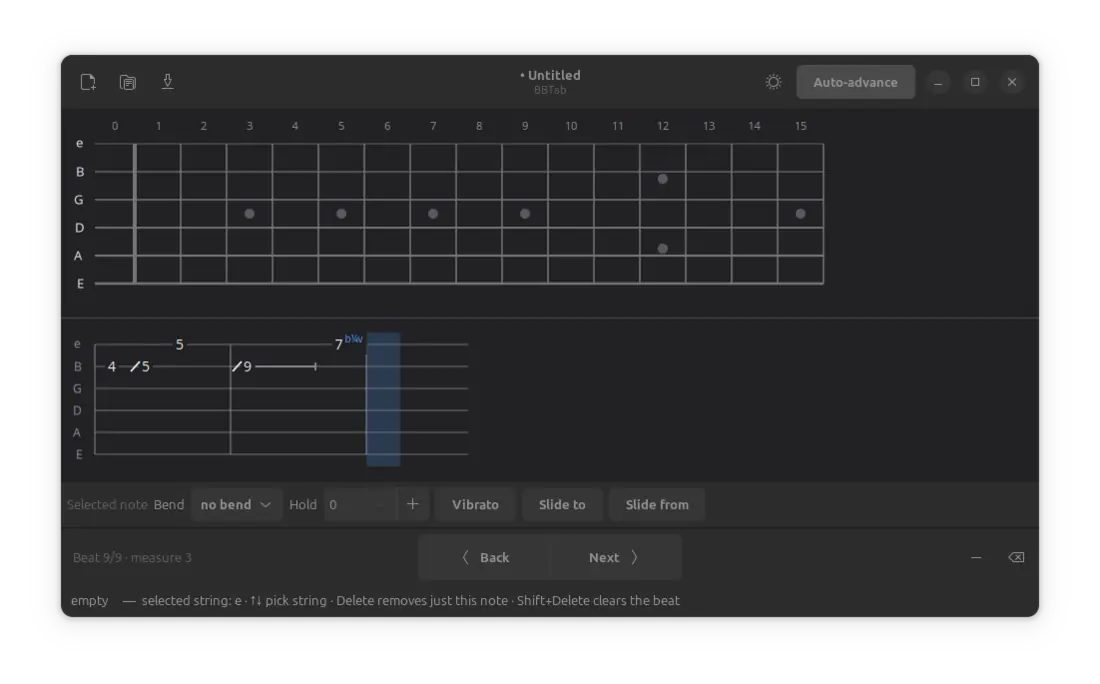
So the whole idea of BBTab is one sentence: click a fret on the fretboard, and the note drops onto the staff below. Click a few frets to stack a chord, hit Space, move to the next beat. That’s the loop. Everything else is decoration around it.
What it is
BBTab is a small, native tab editor for GTK4 / GNOME, written in Python with libadwaita. It’s Linux-first because that’s where I live, and it follows your light/dark preference because I got tired of white rectangles at midnight.
The name isn’t subtle: BBTab is B.B. King’s Tab. It started as the place to write down the licks I stole from him while chasing his tone, and I kept the name because I wanted his fingerprints on the thing. He bent one note where a lesser player would have crammed in ten, and he made you feel every one. If this little editor helps anyone write down a phrase with that kind of restraint, it’s done its job.
The current version (v0.1) does the things I actually needed to notate a blues line:
- An interactive fretboard — open strings plus 15 frets, standard tuning, inlay dots where your eyes expect them.
- A live tab staff with a movable cursor and bar lines every measure.
- Click-to-place notes, chords, and rests, with an auto-advance toggle so placing a note jumps you to the next beat (turn it off to build a chord in place).
- The techniques the blues is actually made of, applied to the selected note:
- Bends — ¼, ½, full, 1½, 2 tones.
- Holds — let a note ring, or bend it, across several beats.
- Vibrato — the thing that makes one note say a whole sentence.
- Slides — into a note and out of it.
- Save / open as plain, versioned JSON
.bbtabfiles. No lock-in, no binary blob — you can read your song in a text editor.
How it’s built
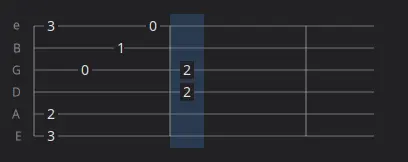
Underneath, BBTab is smaller than it looks. It’s really two hand-drawn canvases sharing one data model, and GTK is just the frame around them.
The model knows nothing about the screen. A song is a list of beats; a beat maps a string to a note; a note carries its fret plus whatever techniques you put on it. It imports no GTK at all and serialises straight to JSON, which means the file format is the data structure:
{
  "format": "bbtab",
  "version": 1,
  "title": "Sweet Sixteen",
  "beats": [
    { "notes": { "0": { "fret": 15, "bend": 1.0, "vibrato": true } } }
  ]
}
The fretboard and the staff are both Cairo DrawingAreas. One turns a click into (string, fret); the other turns the model into fret numbers, slashes for slides, and little lines for held notes, then draws a cursor on top. Keeping the model UI-agnostic meant I could get the drawing wrong many times without ever risking the data — which, given how many times I got the drawing wrong, was the right call.
There’s a keyboard layer over all of it, because once your left hand is on the fretboard your right hand wants the arrows: Space for the next beat, ←/→ to move, ↑/↓ to pick a string, and single keys for bend (b), vibrato (v) and slides (/ \). You end up writing tab about as fast as you can hum it.
It’s open source — two ways in
BBTab is my product, and it’s also open source, and I don’t think those two things fight.
If you want to take it somewhere I’m not going — a different tuning system, a wild export format, your own UI — fork it and make it yours. The license lets you continue the project independently with no obligation to me. It’s your project at that point; go.
If you’d rather it stay this project, send me a suggestion. Bug reports, feature requests, patches — I’ll fold them in according to my own roadmap, in my own time. Both doors are open; they just lead to different rooms.
The code lives here: github.com/sebastjan-rijavec/BBTab.
The roadmap, roughly: note durations and real beat spacing, hammer-ons and pull-offs, playback through fluidsynth, export to ASCII / MusicXML / Guitar Pro, and eventually a Flatpak so you don’t have to touch Python at all.
Where the tone lives
Last time I decided the tone doesn’t live in the amp — it lives in the fingers. That’s still true, and BBTab doesn’t change it. A tab is not the music; it’s a note you leave yourself so the music can happen again tomorrow.
But the note has to live somewhere. Now it lives on a fretboard I can click, in a file I can read, on the operating system I already trust. That’s enough. The rest is still up to the fingers.
For B.B. — and for Lucille, who only ever needed the one note.